At a glance
- Co-create a TEAM.md file that tells AI tools who your team is and how you work
- Surface hidden assumptions about decision rights, AI use, and guardrails
- Produce a version-controlled, repo-ready context file in a single session
- Establish a living document that improves every time the team updates it
This Play is currently in BETA. If you'd like to try this with your team, please reach out: hello@deltawork.ai.
The canvas is designed to be run by any team without a facilitator. Everything you need is on this page. If you'd prefer Delta Work to run it for you, we can do that too.
The Why
AI tools are stateless. Every session starts cold. Your model knows nothing about who you are, how your team makes decisions, or what's sensitive — unless you tell it every single time.
TEAM.md is the file that fixes that. It's a short, structured markdown document committed to your team's repo that loads automatically into every Claude Code session. Think of it as the onboarding document you'd give a new colleague — except the colleague is an AI that forgets everything between sessions.
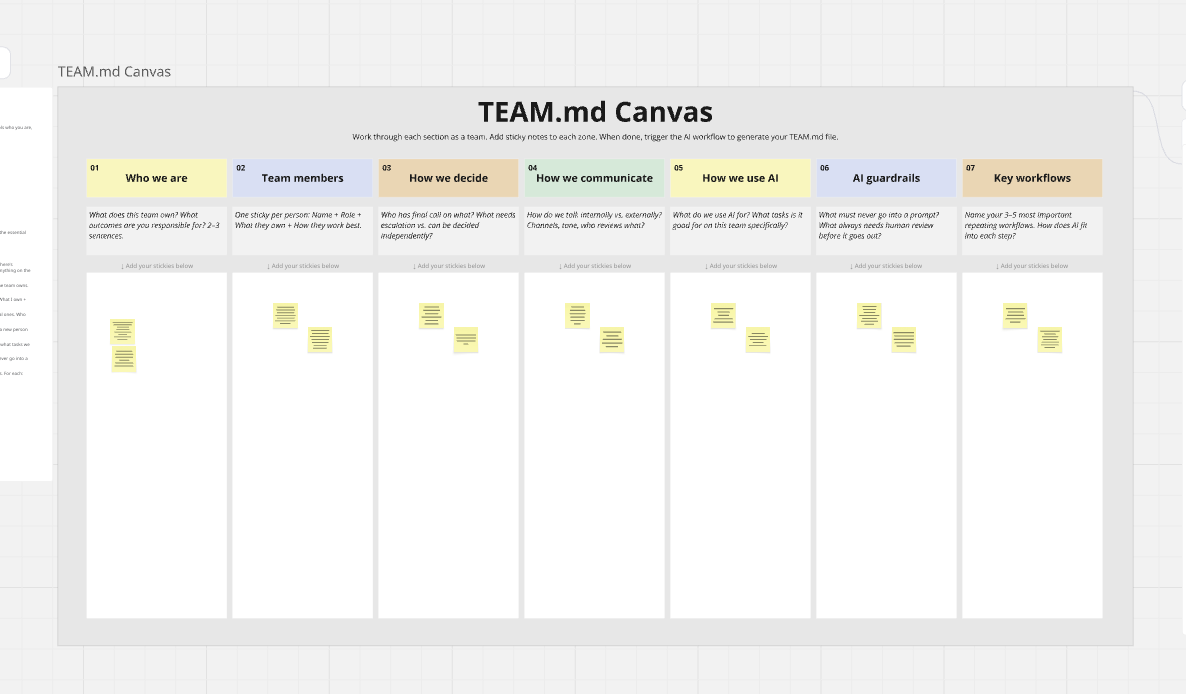
The canvas maps seven sections. Each one captures a layer of context that AI tools currently have to guess at: who's on the team, how decisions get made, what communication norms apply, how you use AI, what guardrails are in place, and what your key workflows look like. Teams populate each section with sticky notes. An AI workflow reads the board and compiles the TEAM.md file directly — no copy-paste required.
How to run it
The canvas is designed to be run by your team lead or any team member without a facilitator. Everything you need is here and in the Miro template. If you'd prefer Delta Work to run it for you, we can do that too.
- Before the session
- Share the Miro board link 2–3 days ahead with a one-line brief: "We're building our TEAM.md on [day]. Have a look at the board beforehand."
- No pre-work required — just familiarity with the seven sections
- Nominate a GitHub owner before the session: someone with write access who will commit the final file to the repo
- Set one norm upfront: specific and honest beats polished. "Write what's actually true, not what sounds good."
- Step 1 — Who we are 5 min
- One person drafts a 2–3 sentence description of what the team owns
- Others add sticky notes to push back, agree, or add nuance
- Synthesise into one statement everyone can live with
- Goal: accuracy, not aspiration
- Step 2 — Team members 10 min
- Each person adds their own sticky: Name + Role + What I own + How I work best
- "How I work best" is the most valuable field — push for specifics. "Prefers data with sources" beats "analytical"
- No editing other people's stickies
- Step 3 — How we decide + how we communicate 15 min
- Map actual decision rights, not aspirational ones. Who has final call? What needs escalation?
- Add communication norms: channels, tone, external review gates
- If there's disagreement, write both positions — the tension is useful
- Step 4 — How we use AI + guardrails 15 min
- Two explicit lists: what we actively use AI for, and what we don't without human review
- Guardrails: what data must never go into a prompt? What always needs sign-off?
- Be specific. "Never put individual names and performance data in the same prompt" is actionable. "Be careful with sensitive data" is not
- This is the most important section. Spend the time here.
- Step 5 — Key workflows 10 min
- Name your 3–5 most important repeating workflows
- For each: where does AI help? Where does a human stay in the loop?
- One sticky per workflow is enough — detail can be added later
- Step 6 — Run the AI workflow 5 min
- With all stickies in place, trigger the AI flow to generate the TEAM.md document
- Review the document as a team and make any necessary adjustments
- Export the document from Miro as a .md file
- After the session
- Review and edit the output together (~15 min)
- Commit TEAM.md to the repo root before end of day
- Add two lines to CLAUDE.md: Read TEAM.md at the start of every session for team context. Apply the guardrails, communication norms, and decision rights described there.
- Test it in the next Claude Code session — does it respond with the right context without being prompted?
- Schedule a quarterly review; changes go through a PR